
SRD R370 Lost or Changed Phone Number
Official SASSA Contact Update Portal
Have you lost your SIM card or changed your mobile number? To keep receiving your OTPs and payment notifications, you must update your details using the official link below. We recommend performing a Srd Status check first to confirm your Application ID.
For many South Africans, the Social Relief of Distress (SRD) R370 grant is a vital lifeline. However, the security of this grant is tied directly to your mobile number. If you lose your SIM card or change your number without updating SASSA, you may lose access to your funds. Regularly conducting a Sassa Status check is the best way to ensure your contact information remains synchronized with your profile.
Why Your Phone Number Matters
Your registered mobile number acts as your primary digital identity within the SASSA ecosystem. It is used for three critical functions:
- OTP Verification: Every time you attempt to log in to the SRD portal or change sensitive information, a One-Time Pin (OTP) is sent to this number to prevent unauthorized access.
- Linked To Your SRD Application: Your application is indexed by your ID number and your phone number. If these do not match during a SRD reapplication, the system may flag the account for fraud.
- Required For Banking Updates: You cannot update your banking details without receiving a secure link via SMS to your registered number.
How To Change Your SRD Phone Number
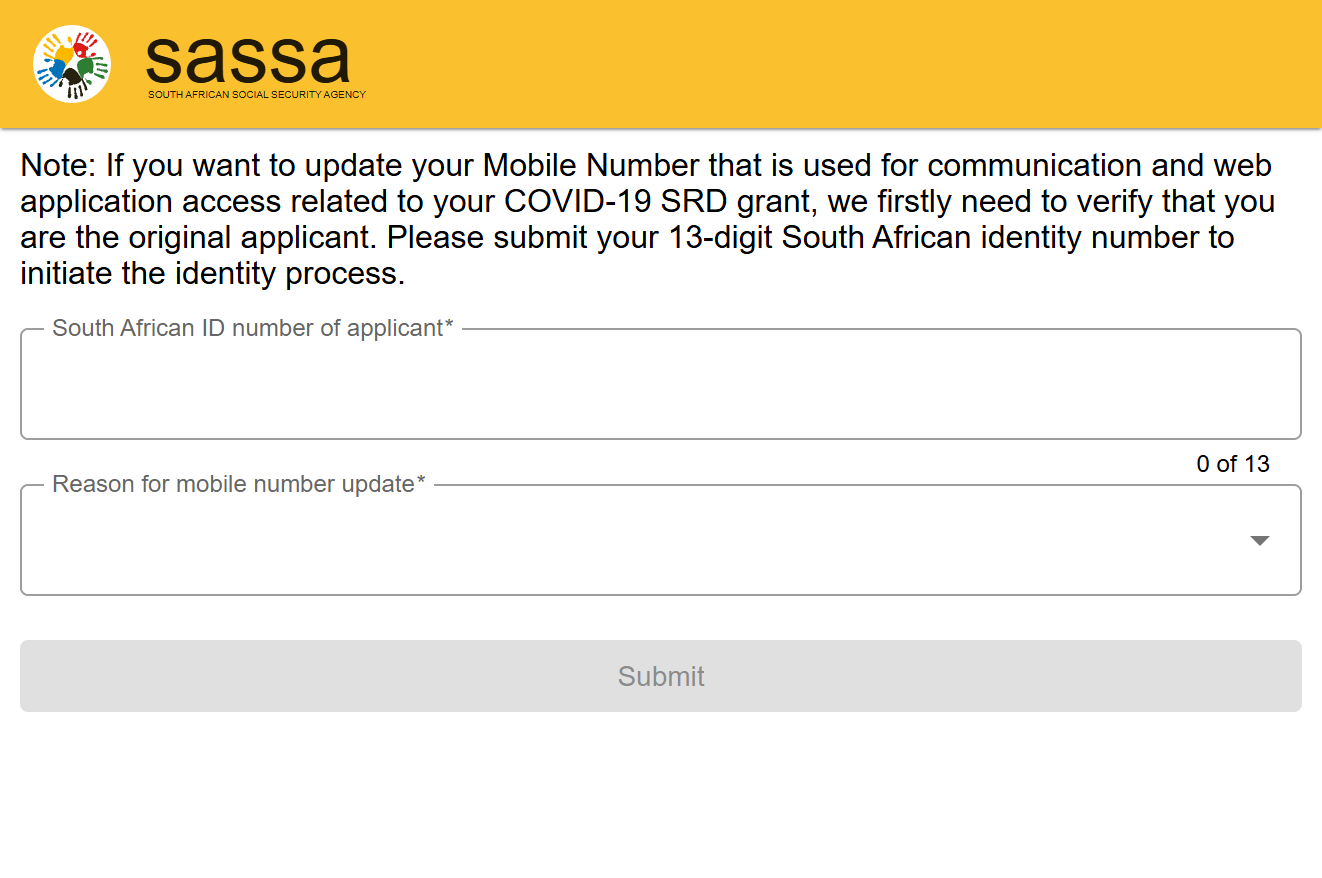
If you still have access to your account but need to transition to a new number, follow the official protocol on the srd.sassa.gov.za website:
- Navigate to the "Change my phone number" section on the official portal.
- Enter your 13-digit South African ID number.
- Identity Verification Process: You will be asked to provide your Application ID (found on your original approval SMS) or answer security questions to prove your identity.
- OTP Sent To New Number: Once your identity is verified, you will enter the new mobile number. SASSA will send a verification OTP to the new number to confirm it is active and belongs to you.
Lost SIM Card Process
If your phone was stolen or your SIM card is lost, your first priority should be securing your number through your network provider (Vodacom, MTN, Cell C, Telkom, etc.).
- Replace SIM At Network Provider: Visit a branch with your original Green ID book or Smart ID card.
- RICA Requirements: You will need proof of residence (not older than 3 months) to complete the RICA process for the new SIM.
- Recover Same Number Option: Always ask for a "SIM Swap" to keep your old number. If you recover the same number, you do not need to update SASSA, as your R370 Status Check will continue to function normally.
If You No Longer Have Access To Old Number
This is a common issue for beneficiaries who have had their numbers recycled by networks. If you cannot do a SIM swap, you must follow the Alternative Verification Method:
SASSA has integrated with the Department of Home Affairs (DHA) to facilitate high-security changes. You may be required to undergo a biometric facial recognition check via your smartphone camera. If this fails, you may need to visit a SASSA branch in person to verify your identity. Be prepared for possible delays, as manual identity confirmation can take 7 to 14 business days to reflect in the system.
Phone Number Update Status
When you attempt to change your contact details, your verification status might show the following:
- “Referred”: This often happens if the new phone number is already linked to another person's ID. This is a fraud prevention trigger.
- “Verification Pending”: Your request is being cross-referenced with the DHA database to ensure the ID holder is the one requesting the change.
- No OTP Received: This usually indicates system congestion or that your mobile network is blocking "Application-to-Person" (A2P) SMS messages.
Common Problems
| Issue | Expert Solution |
|---|---|
| OTP Not Sending | Wait 20 minutes before requesting a new one. Ensure your phone has sufficient signal. |
| Number Already In Use | You cannot share a number with a spouse or friend. Every beneficiary needs a unique RICA'd number. |
| Mismatch Between ID & Phone | Check that your ID number was entered correctly. Typographical errors are common. |
| Update Rejected | If rejected, you must file an appeal or contact the call center at 0800 60 10 11. |
Security & Fraud Protection
Fraudsters frequently target SRD beneficiaries through "SIM Swapping" or phishing. Protect your account by following these rules:
- Never Share OTP: SASSA will never call you and ask for an OTP to "verify your grant." If someone asks for this, they are attempting to steal your funds.
- Official Update Links Only: Only use the links provided on the official SASSA news page or the government portal. Never click on "short-links" (like bit.ly) sent via WhatsApp.
- SIM Swap Scam Warning: If your phone suddenly loses signal and stays "SOS only" for a long time, someone may have performed an unauthorized SIM swap. Contact your bank and SASSA immediately from a different phone.
Need more help? Read our guide on common SRD issues or find the correct SASSA contact numbers for your province. Always keep your information updated to ensure your next payment arrives without delay.
Frequently Asked Questions: SRD Phone Number Management
1. How do I change my SASSA SRD phone number if I no longer have the old SIM?
If you cannot access your old number, you must visit the official SRD portal and provide your 13-digit ID number and Application ID. You may be prompted to complete a facial recognition/biometric check or answer high-security questions linked to your Department of Home Affairs record. It is recommended to perform a Srd Status check to retrieve your Application ID if you have lost it.
2. Why am I not receiving the OTP when I try to update my contact details?
Non-receipt of OTPs is usually caused by high system traffic on the SASSA servers or network delays from your service provider. Ensure your number is RICA’d and active. If the problem persists, consult our common issues guide for troubleshooting network-specific SMS blocks.
3. Can I use my relative's phone number for my R370 grant application?
No. SASSA security protocols require that each beneficiary uses a unique mobile number registered in their own name. Sharing a number with another applicant will trigger a "Referred" status, which halts payments until the conflict is resolved. Maintaining a unique number is a core eligibility requirement for the digital verification process.
4. How long does it take for a phone number update to reflect in the system?
A successful automated update usually reflects within 24 hours. However, if your update requires manual verification from the Department of Home Affairs, it can take up to 14 business days. You can monitor the progress by doing a regular R370 Status Check on the homepage.
5. If I do a SIM swap, do I still need to update SASSA?
If you perform a successful SIM swap with your network provider and keep the same mobile number, you do not need to notify SASSA. Your profile will remain linked to that number, and your SASSA payment dates will not be affected.
6. Does changing my phone number affect my banking details?
Directly, no; but indirectly, yes. You cannot access the portal to change or confirm your banking details without receiving an OTP on your registered phone number. Therefore, keeping your number current is essential for managing how you receive your funds.
7. What should I do if my status says "Referred" after changing my number?
The "Referred" status means your new number has been flagged by the South African Fraud Prevention Service (SAFPS). You will likely need to undergo a biometric verification to prove you are the rightful owner of the ID and the phone number.
Note to Beneficiaries: Always ensure you are performing your Sassa Status check on the official website or trusted partner sites. Never give your ID number or OTP to individuals on social media claiming to work for SASSA.